






TL;DR
Shopify sales notification popups boost conversions by showing real-time or simulated activity, creating social proof and FOMO. They’re most useful for new stores, high bounce pages, promotions, and cart recovery. However, effectiveness depends on proper timing, frequency, and mobile optimization. Overuse can harm trust and user experience.Shopify sales notification popups have become a popular tool for merchants who want to make their stores feel more active and trustworthy. By displaying real-time messages such as recent purchases, product views, or low-stock alerts, these small notifications can influence how visitors perceive demand and credibility. But when do they actually help conversions, and when can they become distracting?
In this guide, we’ll explain what sales notification popups are, when they are most effective, and practical ways to optimize them for better results without harming the shopping experience.
1. What are Shopify sales notification popups?
1.1 Definition
Sales notification popups are small on-screen messages that appear while visitors browse a store. These real-time notifications display customer activity, product demand, or promotional events to make the storefront feel active and trustworthy.
In practice, sales notifications can display different types of notifications depending on the situation:
- Purchase activity: messages such as recently purchased, just bought, or recently ordered that highlight completed orders in the store.
- Visitor activity: signals like a live visitor counter or product view counter showing how other shoppers interact with a product.
- Scarcity: alerts such as low stock notification, inventory alert, or stock counter popup that emphasize limited availability.
- Cart recovery: reminders including flashing browser tabs, cart abandonment alert, or comeback alert that encourage visitors to return to unfinished checkouts.
- Promotion notifications-based: conversion-focused messages such as discount popups, gamification boxes, countdown timer popups, or flash sale popups that highlight time-sensitive offers.
Most of them operate through event-triggered popups or automated notification rules. This mechanism turns everyday store actions into visible social proof and activity signals, which help maintain engagement and guide buying decisions. Many merchants install these tools through the Shopify App Store.
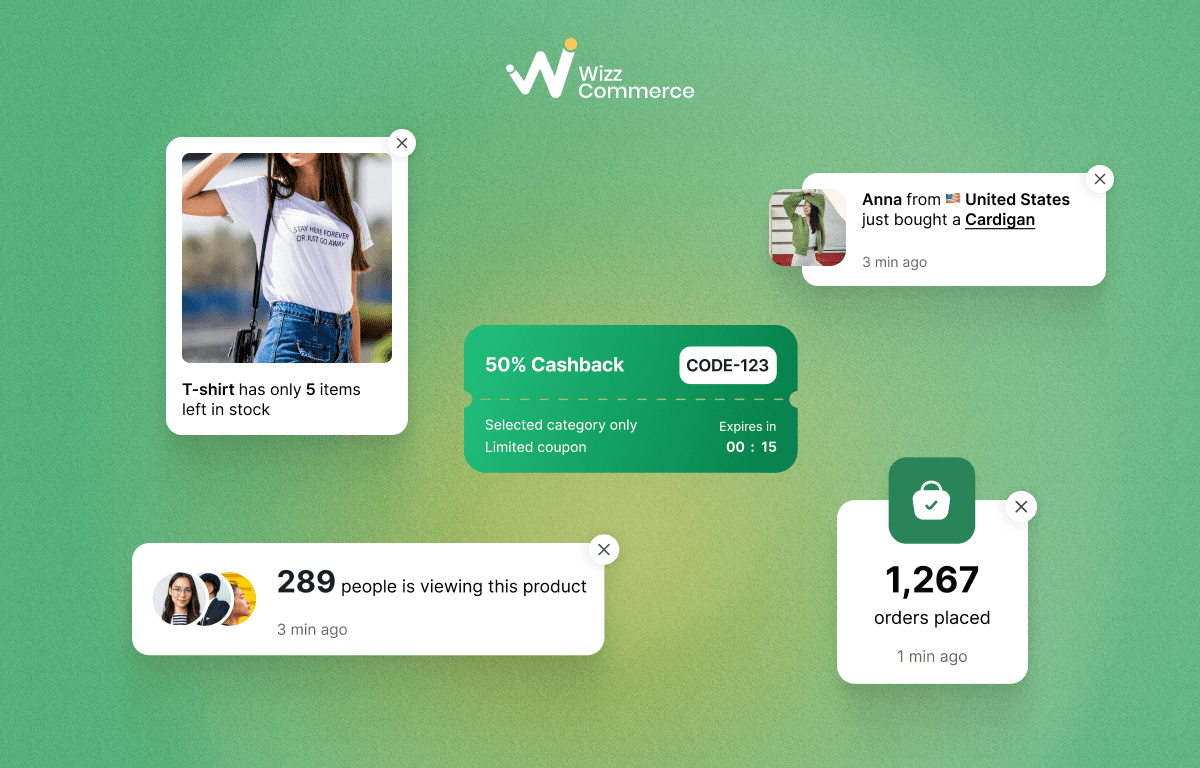
Types of sales notification popups
1.2 Difference between real vs simulated notifications
Not all website pop-ups that display sales activity work the same way. There are two approaches: real notifications and simulated notifications (or fake notifications). Both types appear similar on the surface and can be delivered through a popup app, but the data sources behind them are different.
The table below outlines the key differences between real and simulated notification popups.
‼️Shopify encourages merchants to use real-time data rather than simulated data.
2. Why merchants should use Shopify sales notification popups?
2.1 Creating FOMO that encourages faster decisions
One of the biggest reasons merchants use sales notification popups is their ability to trigger FOMO (the fear of missing out). When visitors see live sales popups, such as recently purchased or inventory alerts, they become aware that other shoppers are actively engaging with the same product. As a result, visitors may feel more motivated to act quickly instead of delaying their decision.
Research shows that 60% of consumers have made purchases influenced by FOMO. When shoppers notice that others are actively buying, they are more likely to follow the same action.
👕Example: Imagine a shopper browsing a product page for a trending T-shirt. While they are comparing colors, a small notification appears saying "Only 5 left in stock!". They may buy the product immediately to not miss it
2.2 Building trust through visible customer activity
For many online stores, especially new ones, building trust is often the biggest challenge. When visitors land on a product page and see no signs of activity, they may question whether the store is reliable.
This is where Shopify social proof pop ups such as product view counters or add-to-cart become valuable. These features display activity signals that indicate other customers are interacting with this store. Visible customer actions act as trust signals, helping strengthen store activity perception and increase purchase confidence.
2.3 Influencing purchase decisions during the shopping journey
During the shopping journey, many customers hesitate before completing a purchase. At this stage, sales popups can act as subtle conversion prompts that influence buying behavior. When shoppers see customer activity notifications such as "Someone just purchased this item" or "5 people added this to cart", it sends strong product popularity cues that reassure them they are making a good choice.
These notifications are event-based or behavioral triggers that appear at strategic moments during the browsing process. When implemented correctly, they enhance the user experience without interrupting the flow.
3. When to use Shopify sales notification popups?
For a new Shopify store, one of the biggest challenges is the lack of social proof. Data suggest that products with 11-30 reviews achieve 68% higher conversion rates than those with zero reviews. This means that without visible feedback or activity, potential buyers may hesitate to trust the store or complete a purchase.
Best notifications:
- Low stock count
- Flashing tab
- Live visitor counter

Example: A Shopify store uses recently purchased notification
3.2 High bounce rates on product pages
A clear warning sign that a store may need sales notification popups is when product pages have a very high bounce rate and extremely short session duration. In many cases, visitors stay for only around 10 seconds before leaving the page without clicking, scrolling, or interacting with any elements. This behavior often indicates that the page lacks strong shopper engagement cues or convincing product popularity cues that would encourage visitors to keep exploring.
In this case, Shopify merchants can combine activity signals with urgency. Purchase activity notifications, such as recently ordered highlights real orders in the store. At the same time, scarcity alerts like low stock notification, stock counter popup emphasize limited availability, motivating shoppers to act sooner.
Best notifications:
- Purchase activity: recently purchased, just bought, recently ordered
- Scarcity alerts: low stock notification, inventory alert, stock counter popup

Example: A Shopify store uses low stock notification
3.3 Promoting limited-time discounts or flash sales
Stores often use sales popup notifications when running limited-time discounts or short promotional campaigns. During these campaigns, visitors may browse products but delay purchasing because they assume the offer will still be available later. Without clear urgency signals, even attractive deals can be ignored.
This is where real-time pop-ups become effective. Promotion-based notifications such as discount popups, countdown timer popups, or flash sale popups visually highlight limited-time offers while visitors browse the store. Behavioral triggers like timers or gamification box (for example, a spin-to-win discount) also activate FOMO, encouraging shoppers to act before the deal expires.
Best notifications: promotion-based popups such as discount popup, countdown timer popup, i, or gamification box

Example: A Shopify store uses discount notification
3.4 Reminding visitors who abandon carts before checkout
One common situation where stores use Shopify sales notification popups is cart abandonment. Visitors may add products to their cart but leave the site before completing the purchase. When this occurs frequently, the store may have strong product interest but low checkout completion.
To address this, merchants use add to cart notification popup Shopify tools designed for cart recovery. These notifications rely on behavioral triggers that detect when a visitor leaves the checkout flow or becomes inactive. For example, a cart abandonment alert can remind shoppers to complete their order, so they don't miss out on the discount. A comeback alert may appear when the visitor returns to the site, encouraging them to finish the order. Some stores also use a flashing browser tab to draw attention back to the unfinished checkout.
Best notifications: cart recovery alerts such as cart abandonment alert, comeback alert, or flashing browser tab

Example: A Shopify store uses low stock notification
Check out this article to learn how to add sales popups to your Shopify store.
4. How to optimize Shopify sale notification popups for better conversions?
4.1 Set the right popup timing, frequency and placement
Using Shopify popup apps effectively is not just about showing more notifications. The real goal is optimizing timing, frequency control, placement and popup targeting rules so that messages support conversions without harming the user experience. Poorly timed popups can interrupt browsing and cause visitors to leave, while well-configured triggers can guide attention at the right moment.
Key optimization practices include:
- Use timing based on visitor context: Welcome popups for first-time visitors should appear within 0-5 seconds. Most other notifications popups perform better when triggered after 6-10 seconds, once the visitor starts exploring the page.
- Trigger popups based on behavior: Exit-intent triggers or showing a popup after a visitor views 2-3 pages usually performs better than a random 5-second trigger because it responds to real browsing signals.
- Apply proper frequency control: Instead of showing the same popup every session, limit it to once every X days to avoid repetition fatigue.
- Set suppression rules: If a popup is closed, configure rules to hide it for 7-14 days and limit the number of displays per session.
These settings help maintain a balanced customer journey while still capturing attention at key decision moments.

A 10% discount notification for the first order appears 5 seconds after entering the website
💡Tips: You can adjust timing, frequency control, and placement directly within the settings of sales notification apps. Most tools in the Shopify app ecosystem include built-in options. These are reviews of the top 9 best sales notification apps in 2026
4.2 Use real activity signals when possible
Many new Shopify stores start with simulated notifications because they simply don’t have enough customer data yet. However, once your store begins generating real traffic and orders, switching to real-time notifications becomes essential for building long-term trust.
These notifications are automatically generated when a real action happens on the site. Common examples include:
- Recently purchased alerts showing that a customer just completed an order
- Add-to-cart notification messages triggered when a shopper adds a product to their cart
- Visitor counter popup indicators displaying how many people are currently viewing a product
For growing Shopify stores, simulated notifications should only be a temporary bridge. As soon as reliable data becomes available, transitioning to real activity notifications helps strengthen credibility and makes your sales signals feel more authentic.
4.3 Optimize popups for mobile shoppers
Many Shopify merchants focus on optimizing their website pop-up design for desktop screens. However, a large portion of visitors shop on mobile devices. In fact, mobile devices now account for approximately 57% of global ecommerce transactions, which means poor mobile optimization can directly hurt conversions on your Shopify storefront.
A common issue is that popups look fine on the desktop but break the layout on smaller screens. For example, a popup may cover the CTA buttons, block product images, or make it difficult to scroll.
To avoid this, merchants should apply mobile-friendly optimization when configuring notification popups:
- Ensure popups do not cover key elements like "Add to Cart" or product images
- Use smaller popup sizes that fit naturally on mobile screens
- Position notifications near the bottom or corners instead of the center
- Test popups on multiple screen sizes before publishing

Popups should display correctly on both mobile and tablet devices
4.4 Test different notification types
Not every popup works the same for all Shopify stores. Different audiences respond to different types of notifications. That's why A/B testing is an important part of popup optimization.
Instead of relying on a single popup style, merchants can experiment with multiple notification types to identify what drives engagement and conversions. You can gradually identify which combination produces the best results. Over time, data-driven optimization helps ensure that popups support conversions rather than interrupt the shopping experience.
5. When Shopify stores should stop using notification popups?
5.1 Overuse fake notification
For brand-new Shopify stores, using simulated notifications can make the site feel more active and encourage visitors to keep browsing. But they should only be a temporary strategy, as they can carry some legal risks and damage customer's trust.
👩Example: Imagine you’re looking to buy an expensive watch as a gift. After saving up for a month, you return to the store. You find the exact same notification popups as the first time. You immediately begin to question the authenticity of the information.
5.2 When popups start disrupting user experience
Notification popups are designed to guide visitor attention and create shopper engagement cues. However, if popups appear too often or block important content, they can quickly harm the overall user experience. That's one of the reasons why most new Shopify stores fail.
Common signs that popups are disrupting the shopping experience include:
- Too many notifications appear within a short time, making the page feel crowded
- Notifications repeating the same message, which can make them feel automated or irrelevant
- Multiple popup types triggering at once, such as discount offers, visitor counters, and sales alerts simultaneously
When these issues appear, reducing the number of popups or adjusting trigger rules can help restore balance. Notifications should support browsing, not compete with it.
Conclusion
Shopify sales notification popups can be powerful tools for increasing engagement and guiding purchase decisions when used strategically. However, their effectiveness depends on careful optimization. When used thoughtfully, notification popups enhance the shopping experience rather than interrupt it.
FAQs (Frequently asked questions)
1. What is the best pop-up app for Shopify?
A good popup app should offer customization, real-time notifications, frequency control, and mobile-friendly design. Shopify apps for new stores can be different from apps for mature stores. The best popup app depends on your goals. Here is a comparison table to help you choose the right app for your needs.
2. Why are my sales not popping up on my Shopify?
Sales notifications may not appear if the popup app is not properly connected to your Shopify store data, the trigger rules are incorrect, or there have been no recent orders. Check your app settings, notification triggers, and whether real-time order data is enabled.
3. What makes a good popup box?
A good popup box is timely, relevant, and non-intrusive. It should appear at the right moment, display clear messages, and avoid blocking important elements like product images or "Add to Cart" buttons. Effective popups also follow frequency control rules and are optimized for both desktop and mobile devices.