






TL;DR
Shopify push notifications help recover abandoned carts, alert customers when items are back in stock, deliver real-time order updates, and drive flash sales effectively. To maximize results, personalize your messages, send at the right time, keep content concise, and A/B test regularly. You can use Hextom or PushOwl to set up push notification,In this guide, you’ll learn what Shopify push notifications are, how they work, and when to use them for maximum impact. We’ll also break down proven best practices, messaging strategies, and tools to help you turn missed opportunities into consistent sales growth.
1. What are Shopify push notifications?
1.1 Definition
Shopify push notifications are short messages that appear directly on your customer devices, even when they are not visiting your store. This channel works on an opt-in basis. Customers simply allow notifications through their browser or an app without sharing personal details like email or phone numbers.
1.2 Types of Shopify push notifications
There are two main types of Shopify push notifications :
- Web push notifications: They are sent through web browsers like Chrome, Firefox, and Safari on both desktop and mobile. This type is easy to set up using Shopify apps and requires no coding. However, they have limited support on Safari for iOS unless users add your store to their home screen.
- Native app push notifications (Mobile push notification): These are sent through mobile apps installed on your customers' phones. The notification banner shows up directly on the lock screen and supports rich message formats like images and buttons. You need your own app to use them
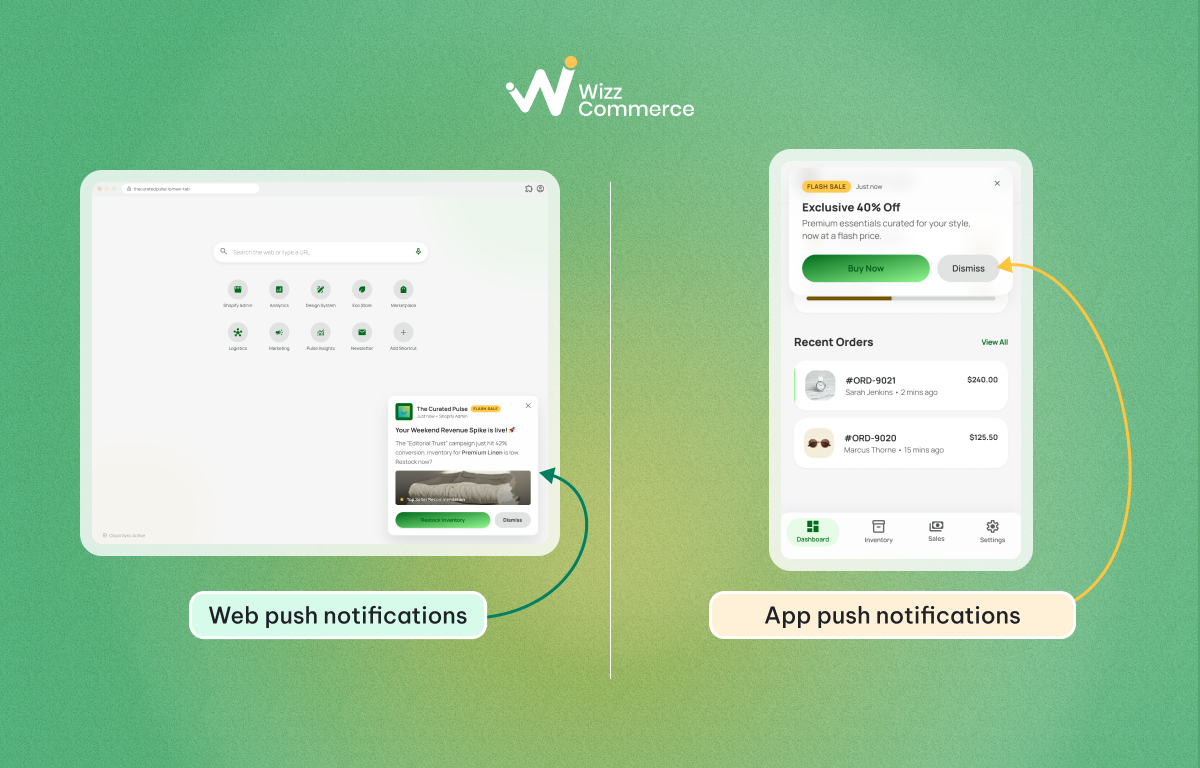
Two types of ecommerce push notifications
1.3 Benefits of using Shopify push notifications
A good push notification strategy can bring real results to your Shopify store. Here is what Shopify push alerts can do for your business:
- Low cost: Unlike SMS or paid ads, push notifications are a low-cost channel. After the initial setup, you can send unlimited messages with little to no extra cost.
- High engagement and better conversion rate: Push notifications grab attention right away. Open rates can reach over 90%. Moreover, push notifications are effective in driving sales by promoting new products, flash sales, and limited-time offers. They can generate up to 4x more revenue per user compared to email.
- Reduce abandoned carts: Around 71.72% of shoppers leave without completing their purchase. Push notifications let you reach these customers at the right moment and bring them back to finish their order.
- Stronger customer retention: Sending timely and relevant updates keeps your brand in customers' minds. This builds long-term loyalty and encourages repeat purchases.
1.4 Push notifications vs pop-ups
Both push notification shopify and pop-ups are popular marketing channels used to engage customers. However, they work at different stages of the customer journey and serve different goals.
Here is a quick comparison table to help you understand these differences:
2. When to use Shopify push notifications
2.1 Recovery abandoned cart
Shopify abandoned cart push notifications are one of the most powerful ways to recover lost sales. They work so well because they reach customers when their buying intent is still high, and the message appears instantly on their screen, making it hard to ignore.
When setting up your Shopify cart recovery notifications, keep these tips in mind:
- Do not send too soon or too often: Wait a moment after the customer leaves. Set up a sequence of no more than 3 messages to avoid annoying people and causing them to unsubscribe.
- Use the right timing for each notification:
- First message: 30 minutes after user leaves, send a gentle checkout reminder like "You left something in your cart"
- Second message: 2 to 4 hours later, add urgency with a message like "Your cart is waiting. Complete your order before it sells out!" to trigger FOMO (Fear of missing out).
- Third message: 24 hours after the cart was left
- Solve the real problem: 39% of shoppers leave because of shipping costs or price concerns. Use your messages to offer a free shipping code or a small discount. This directly removes the barrier and improves your conversion rate.
- The message should be simple and direct with the product name and a link back to the cart
👟 Example: Imagine you need to buy a pair of shoes and are torn between two different stores. After being offline for a while to focus on work, you check your phone and see a Shopify web push notification like: "You have an unused discount code. Complete your order before it expires!" from one of those stores. You would likely be more inclined to buy from this store to not miss out on such a good deal.
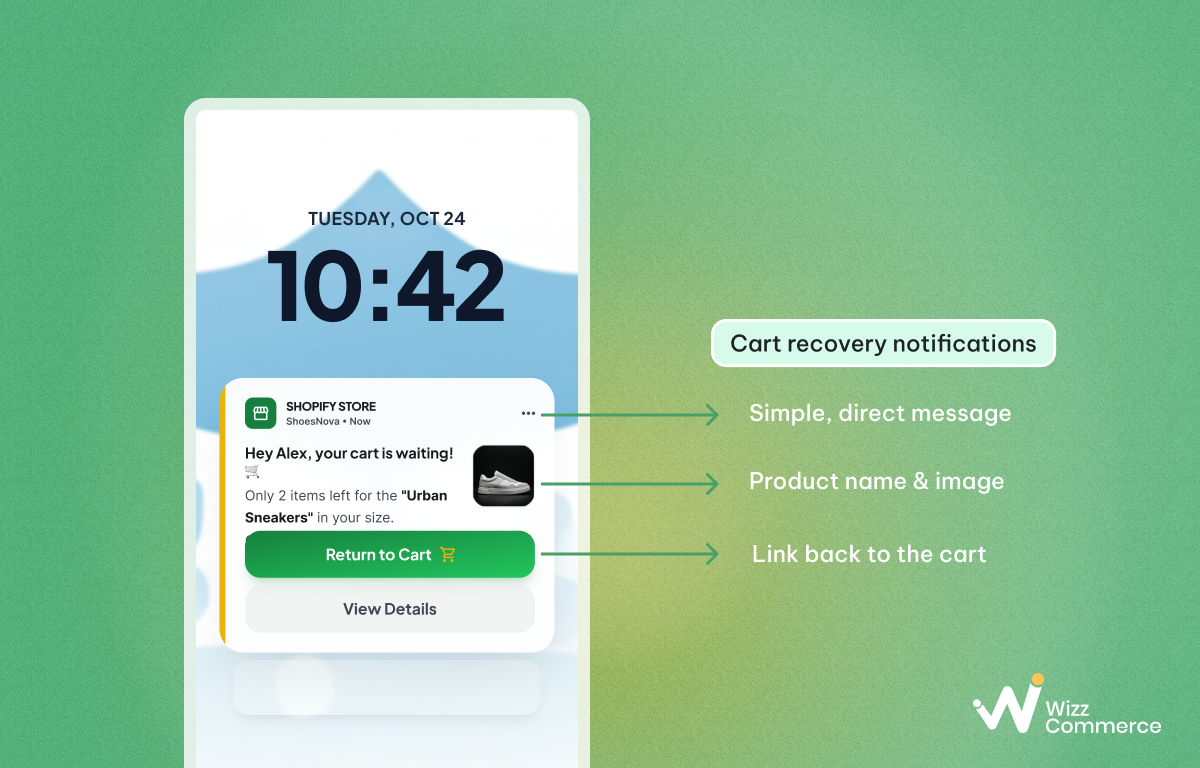
Shopify cart recovery notifications
2.2 Back-in-stock alerts
Shopify back in stock push notifications are messages sent to customers when a product they wanted is available again. Customers can sign up to receive these alerts for any out-of-stock item they like. Because they already wanted to buy, this group is much easier to convert.
There is also a psychological side to this. When a product is out of stock, people tend to see it as more valuable. When it comes back, they feel the urge to act fast before it sells out to someone else. Receiving a restock notification then acts as a positive trigger, making the eventual purchase feel like a rewarding win.
You can add this alert using Shopify push notification apps. Here are a few tips for setting this up well:
- Sync your store data: Connect your store inventory with your push notification app. This lets the system send back-in-stock alerts automatically, so you do not have to do it manually every time.
- Give VIP customers early access: Notifying your best customers first makes them feel special. This kind of exclusive treatment builds loyalty and strengthens customer engagement over time.
- Use a warm and positive tone: Your message should feel like good news. Try something like "Great news! Your favorite item is back" or "The one you wanted is ready for you." Keep it friendly and exciting.
2.3 Order updates and notifications
Order updates and transactional notifications give customers clear, real-time information about their purchase. This includes order confirmation messages, payment receipts, shipping update alerts, and security confirmations.
These notifications not just helpful, they are needed. Research shows that around 66% of consumers feel anxious at some point after placing an online order. They wonder where their package is, whether it will arrive on time, or whether it will arrive at all. Sending timely updates directly to customer devices through Shopify checkout reminder notifications removes that anxiety before it even starts.
Setting this up is straightforward. Use automated triggers for key moments such as order confirmation, shipping, out for delivery, and delivered.
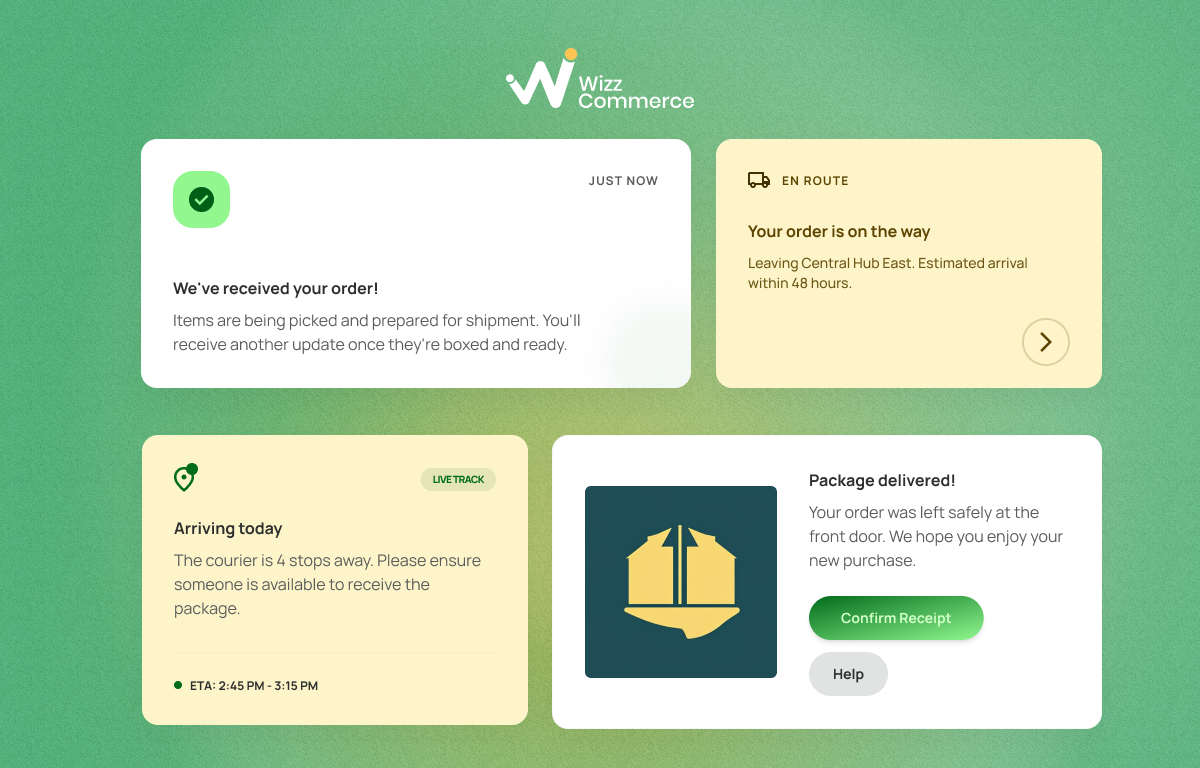
Order updates notifications
2.4 Flash sales and limited-time offers
Flash sale push notifications and limited-time offers are a perfect match for push notifications as a channel. Unlike email, which can sit unread for hours, or social media, which depends on algorithms, push notifications reach your customers' screens within seconds. That speed is exactly what makes them ideal for time-sensitive promotional campaigns.
The psychology is simple: when people know an offer will disappear soon, they want to act right away. This is what makes these FOMO notifications so effective at driving quick decisions and boosting your conversion rate.
Here are a few things to keep in mind when running a flash sale with discount notifications Shopify:
- Send early to build excitement: Do not wait for the sale to start before sending your notification. Send it 15 to 30 minutes before the flash sale begins. This gives customers time to prepare and builds anticipation.
- Use time-based message: Make the deadline clear and direct. Try headlines like "24-hour deal ends tonight," "Limited offer. Buy now before it is gone," or "24h flash sale: 40% off all summer dresses."
- Do not overuse: Deploy them strategically and avoid over-saturation to ensure you don't annoy shoppers or undermine the credibility of your promotions.
👍Pro-tips: During flash sales, you can combine push discount notifications with a gamified cart to drive even better results. Check out this guide on gamified carts versus traditional discounts to learn more.
2.5 New product announcements
Announcing a new product through push notifications is one of the fastest ways to get eyes on your latest launch. Whether it is a new item, a fresh collection, or a new variation, Spush notifications let you reach your existing customers right away. This means you can drive early sales without spending extra on ads.
To build excitement, send your promotional message 1 to 3 days before the launch date. This gives customers time to look forward to it and increases the chance they will visit your store on launch day.
One thing to keep in mind is that, similar to back-in-stock alerts, this type of notification usually requires customers to opt in first. Do not rush them into subscribing right away, as this can create friction and lead to cart abandonment. Instead, focus on building trust over time through their customer journey with your brand.
👍 Pro-tips: A good way to encourage sign-ups is to offer a reward system, such as points they can redeem for gifts or discounts. When customers see real value in subscribing, they are much more likely to say yes.
3. Best practices for Shopify push notifications
3.1 Smart opt-in strategy
The timing of your opt-in request matters more than most people think. Do not ask for notification banner permission the moment someone lands on your site. Wait until they have browsed a few pages, spent 30 to 60 seconds exploring, or added an item to their cart. By that point, they already see value in your store and are much more likely to accept Shopify push notifications when it appears.
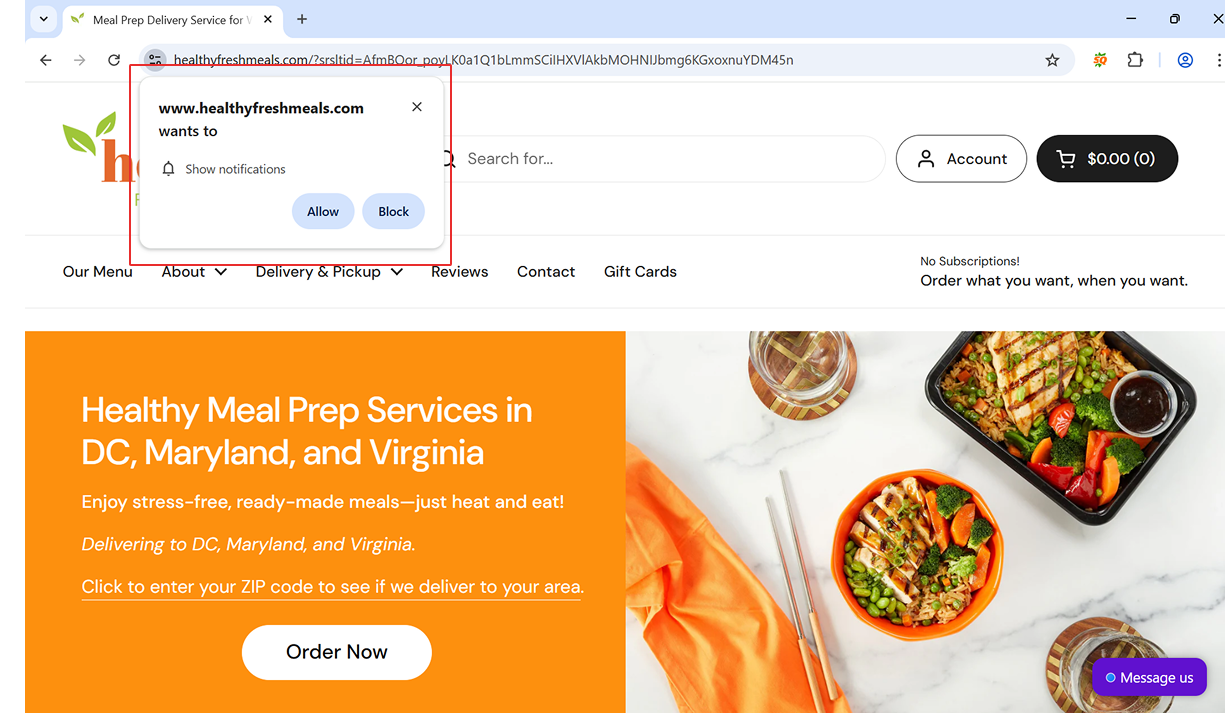
Show a notification 30 seconds after the user enters the page
3.2 Keep messages short, clear, and use rich media
A good ecommerce push notification should be easy to read and get straight to the point. The goal is to make your message clear enough that customers know exactly what to do in just a few seconds.
- Keep your message short: The standard length is 25 to 50 characters for the title and up to 150 characters for the body. Staying within these limits means your text will not get cut off on any device.
- Use rich media (images, emojis, icons): Add product images, GIFs, or emojis to make your promotional push messages stand out visually. A notification with a strong image catches the eye much faster than plain text.
- Add a clear CTA button: Tell customers exactly what to do next. A simple button like "Shop Now," "Claim Offer," or "See What's Back" gives them a direct path to act. A well-placed CTA button can make a big difference in your click-through rate (CTR).
3.3 Personalization and segmentation
The more relevant your message is to each customer, the higher your click and conversion rates will be. Personalization and segmentation for push notifications work together to make every message feel like it was made for that specific person.
Customer segmentation means splitting your audience into smaller groups based on shared traits:
- Browse behavior: Group customers by the pages or categories they visit. Someone who often looks at sportswear should not get notifications about kitchen products.
- Purchase history: Send different messages to first-time buyers, repeat customers, and VIP shoppers.
- Cart status: Separate customers with items in their cart from the rest. Use real-time user behavior tracking to trigger cart recovery messages for one group and promotional messages for the other.
- Recency: Adjust your tone and offers based on how long it has been since a customer last visited or bought.
- Location and time zone: Send messages at the right time for each customer. Stores with physical locations can even use geolocation to invite nearby customers to visit.
3.4 Monitor timing and frequency
Getting push notification timing right is just as important as the message itself. Send promotional push notifications to Shopify customers between 7 am and 10 pm in their local time. Going outside these hours can interrupt their sleep or private time, which creates a negative impression of your brand.
Frequency matters too. Avoid sending the same type of message several days in a row. Too many messages in a short period leads to notification fatigue, which means customers will either ignore your alerts or unsubscribe altogether.
🔔 Example: Imagine constantly receiving notifications like "Only 1 hour left!" or "Your discount expires in 15 minutes!" for days from the same store. Instead of acting, you’ll feel frustrated and begin to doubt the deal's credibility, suspecting that the "discounted" price is actually just the normal one.
3.5 A/B testing
A/B testing is one of the simplest ways to increase conversion rate Shopify over time. Send two versions of a notification to different groups and compare the results. Test one element at a time to get clear answers.
Things worth testing include:
- Message title and body copy
- Send time and frequency
- Images size
Track your click-through rate (CTR) and conversion rate after each test. Use the results to improve performance with every campaign you run.
4. Some Shopify apps that help you set up push notifications
Choosing the right tools is important if you want to get the most out of Shopify push notification apps. Many apps offer built-in automation to help you send messages at the right time without manual work.
Below are the top 2 best push notification apps for Shopify you can consider.
👍 If you run a small store and mainly need simple web push notification tools, Hextom is a good choice thanks to its easy setup and lower cost. For mid-sized to large stores that need more advanced features, deeper automation, and better analytics, PushOwl is the better option.
Conclusion
Shopify push notifications are a powerful tool that works across every stage of the customer journey. From cart recovery to flash sales, back-in-stock alerts to order updates, each message is a chance to reconnect with your audience and increase AOV with notifications over time.
The key is to start simple, test often, and keep your messages relevant. When done right, push notifications become one of the most cost-effective channels in your entire marketing strategy.
FAQs (Frequently asked questions)
1. How to recover abandoned carts with Shopify push notifications?
Send a sequence of up to three push notifications: the first after 30 minutes, the second after 2 to 4 hours, and the third after 24 hours. Focus on addressing the main purchase barrier, such as shipping costs, by offering a discount or free shipping code to encourage customers to complete checkout.
2. Why do customers ignore push notifications on the Shopify store?
Customers often ignore push notifications when messages are sent too frequently, delivered at the wrong time, or feel irrelevant to their interests. Personalized and well-timed notifications generally achieve higher engagement and conversion rates.
3. Are Shopify push notifications effective for small stores?
Yes. Shopify push notifications are low-cost, simple to implement, and effective for re-engaging visitors. They are especially useful for small stores looking to improve retention and recover abandoned carts without large marketing budgets.