






TL;DR
Fake Shopify notifications simulate sales or activity to create social proof, urgency, and FOMO, especially useful for new or low-traffic stores. When executed realistically, they can boost conversions. However, overuse or poor setup harms trust. Best used as a supporting layer alongside real social proof to amplify momentum and reinforce buyer confidence.Fake Shopify notifications are simulated purchase alerts that display customer activity which didn't actually occur. They help new stores overcome zero-social-proof problems but create trust risks if shoppers detect the simulation. Best used sparingly for your first 30-60 days, then switched to showing real customer activity.
Understanding what fake notifications actually are, why merchants turn to them despite risks, how shoppers detect simulation patterns, when they might make strategic sense, and what authentic alternatives build sustainable trust.
1. What Are Fake Shopify Notifications?
1.1 Definition of Shopify fake notifications
⭐ Example: A visitor lands on your product page. After 8 seconds, a popup appears: "Sarah from Texas just purchased Premium Bundle 3 minutes ago" with dismiss button.
- Fake purchase or fake recent sales alerts
- Simulated low stock notifications
- Visitor counters alerts
The core purpose of fake sales popups Shopify is to create perceived activity. They signal popularity and momentum rather than reflecting actual customer behavior.
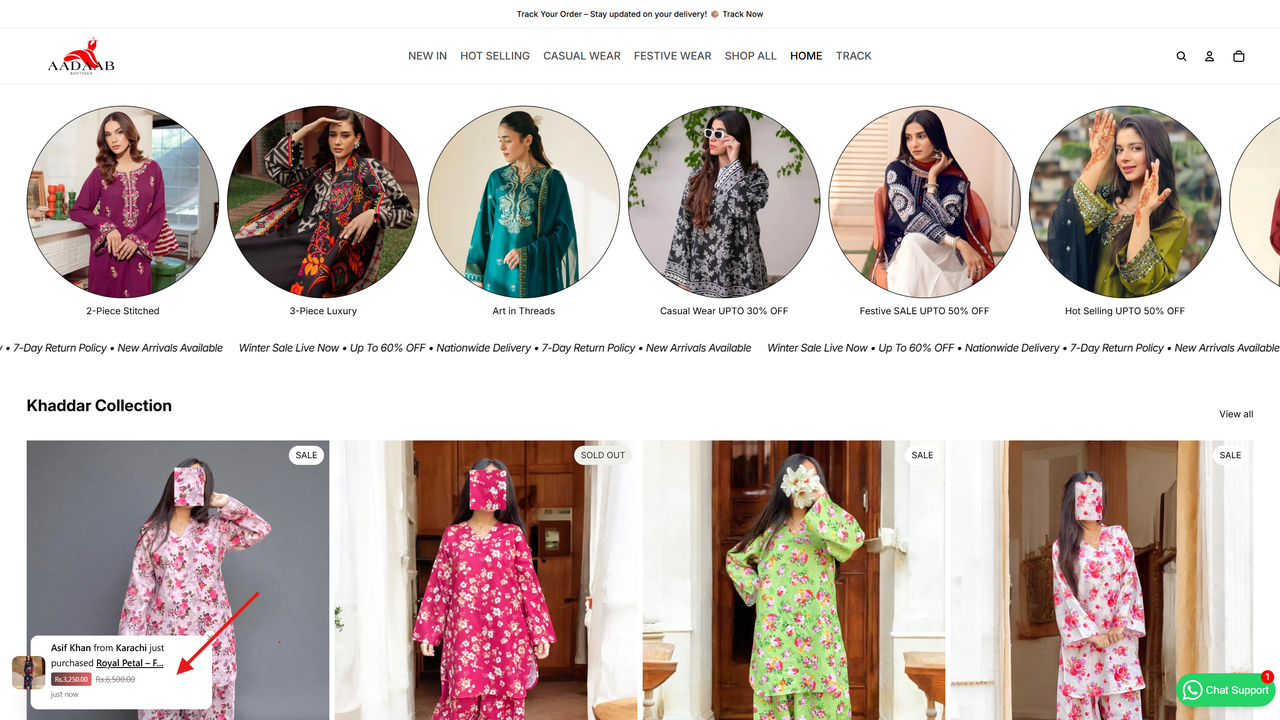
A fake sales popup displayed on a Shopify home page (Source: WizzCommerce Customer)
1.2 Fake vs Simulated vs Real-Time Shopify Notifications
Not all notifications work the same way. Understanding the differences helps you make smarter choices. If you're deciding between simulated and real-time approaches, see our detailed comparison of Shopify real vs fake notifications to understand how each type impacts trust and conversion.
- Names: Rotating list of 100-500 common first names
- Locations: Major cities worldwide (New York, London, Tokyo)
- Products: Random selection from your catalog
- Timing: Fixed intervals (every 30 seconds) regardless of actual traffic
🔥 Example: A store with only 3 daily visitors might show purchase notifications every 30 seconds, claiming dozens of sales.
- Purchase alerts correspond to actual Shopify order IDs
- Visitor counts pull from Google Analytics or Shopify analytics
- Stock alerts reflect true inventory levels in real-time
- Add-to-cart notifications show genuine shopping activity
To see how these formats appear in real stores and how they are implemented, explore our complete guide to Shopify sales notification popups.
2. Common Types of Fake Sales and Activity Popups
2.1 Purchase Notifications
Purchase Notifications are the most common. They work because they suggest other customers already evaluate your product and trust it enough to buy. Psychology is simple: when we're uncertain about decisions, we look at what others are doing for guidance.
2.2 Visitor Activity Alerts
2.3 Stock Scarcity Messages
These combine activity signals with inventory pressure. In many Shopify stores, they also work alongside gamified conversion elements such as countdown timers, free shipping progress bars, and unlockable rewards designed to keep buyers engaged through checkout.
However, poorly implemented scarcity alerts can backfire. When shoppers notice the same "Only 2 left!" message sitting there for weeks, they quickly recognize the lack of authenticity and the store's credibility is instantly undermined.
2.4 Add to Cart Notifications
These demonstrate international demand and global credibility. Geographic diversity suggests established, trusted stores. Cart activity popups can also gently encourage hesitant shoppers to continue checkout instead of abandoning their carts. Most effective for fashion, electronics, and lifestyle products with international appeal.
2.5 Review Activity Popups

5 common fake notification types Shopify stores
3. Why Shopify Stores Use Fake Notifications
3.1 The Early-Stage Problem: Low Traffic and No Social Proof
Without visible social proof, visitors hesitate to trust the store or complete a purchase, which is one of the main reasons why new Shopify stores fail.
- Visitors hesitate
- Conversion rates remain low
- Reviews accumulate slowly
Fake Shopify social proof attempts to break this cycle by simulating early activity. Used briefly, they may help first-time visitors stay engaged long enough to convert. Used long-term, they often erode trust.

Fake notifications breaking the loop of no social proof
3.2 Social Proof and FOMO Psychology
Social proof is the instinct to follow others when we feel uncertain. This uncertainty appears immediately on new or unfamiliar Shopify stores, where shoppers question trust, product quality, and delivery reliability. Signals like "23 people viewing this product" act as fast credibility cues. They suggest active engagement from other buyers, reducing hesitation and encouraging shoppers to continue exploring instead of leaving.
FOMO (Fear of Missing Out) operates on loss aversion, which is Nobel Prize-winning research by Daniel Kahneman. His research on Prospect Theory proved that people are roughly 2.5x more motivated by avoiding losses than by achieving potential gains. Shoppers experience stronger emotional responses to "missing out" on products others are buying than to gaining products.
💡 Example: Two identical coffee shops side by side. One has a line out the door. The other is empty. Which one do you assume makes better coffee? The busy one, even though you have zero actual knowledge about their coffee quality. That's social proof.
3.3 Perceived Activity vs Actual Store Performance
For example, a store may show "someone purchased 2 minutes ago", while Shopify analytics reveal only 2-3 real orders per day. This perception gap shapes outcomes differently over time.
First-time visitors often accept notifications at face value. Social proof signals reduce hesitation, leading to a temporary 5-15% lift in conversion rate, slightly lower bounce rates, and longer browsing sessions.
Medium term (months 3-6):
As repeat visitors return, patterns become noticeable. The novelty fades, detection increases, and conversion gains shrink to 2-5%. At this stage, reliance on simulated activity slows the development of real reviews and authentic trust signals.
Long term (6-12+ months):
Outcomes diverge. Stores that transition to real-time notifications and genuine social proof sustain 8-12% conversion growth. Stores that continue using fake notifications often see conversions drop 10-20% and brand trust erode.
The key trade-off is simple: short-term conversion boosts versus long-term customer trust. For brands focused on lifetime value, authentic social proof consistently wins.
4. How Fake Shopify Sales Notifications Work
If you're setting up Shopify sales popups, our guide explains configuration steps and key notification settings.
-
1. Time-based triggers, such as showing a popup every fixed interval
-
2. Rule-based triggers, such as after page load or scroll
-
3. Looping sequences that repeat predefined messages
These triggers activate notifications regardless of actual customer behavior.
Recent sales popup Shopify does not verify purchases, customer identities, or checkout completion.
- Launching a new store with no order history
- Low traffic periods with few actual sales
- Testing products before reviews build up
- Competing with established brands that have extensive social proof
- Needing quick social proof while building authentic signals
To choose the right tool for your online store, see our comparison of the top Shopify sales notification popup apps available today.
5. The Trust Question: Are Fake Shopify Notifications Misleading?
In most cases, fake notifications are not questioned immediately. First-time visitors often accept them at face value, which explains why some stores experience short-term conversion gains. The issue begins when notification behavior no longer matches the rest of the store experience.
- Repeating buyer names appearing again and again
- Purchase popups firing at fixed intervals regardless of time of day
- Static scarcity messages like "Only 2 left" lasting for weeks
- Products marked "selling fast" while no new reviews appear
In some cases, this also raises legal and compliance concerns depending on how these notifications are implemented. To understand the boundaries more clearly, learn whether fake Shopify notifications are legal and safe.
Perceived inauthenticity can influence how shoppers evaluate product quality, customer service, and overall brand reliability. Over time, this may affect repeat purchases, customer trust, and long-term brand perception.
👉 A product page shows a badge saying "Best-seller" or repeated "Someone just purchased" popups, but the review section tells a different story.
- The latest review is from two months ago, and the total review count hasn't changed.
- Shoppers can sense the mismatch: if people are buying constantly, why is no one leaving feedback? Or why does a product with negative reviews still appear highly active?
6. When Should Shopify Stores Use Fake Notifications
6.1 Qualifying Criteria Framework
- Brand-new Shopify stores (0-60 days old)
- Minimal social proof (fewer than 20 total reviews)
- Low daily traffic (30-200 visitors) and very few sales (0-3 orders/day)
- Impulse-buy focused stores (low-to-mid priced products, typically $15–$75)
- Stores selling viral, seasonal or limited-time product models (e.g., holiday items, limited editions)
- Casual consumer audiences (18-35)
- Everyday product categories (fashion accessories, home decor, general consumer goods)
- Competitive niches or hobby-focused stores (e.g., gaming, fitness, crafts) where similar notification tactics are already common
✨ Example: A new phone case store launches with no reviews. Visitors land on the product page, like the design, but hesitate because no one else appears to have bought it yet. A light popup such as "Someone just purchased this item" can help keep visitors browsing instead of leaving immediately.
At this stage, the goal is not to simulate success, but to reduce initial friction while real signals are still being established.
- Stores 60-120 days old with early traction
- Some existing reviews (20-50)
- Moderate traffic and sales volume
- Mid-range pricing ($75-$200)
- Mixed or more informed audiences
- Categories like beauty, electronics, or fitness equipment
✨ Example: A skincare store has 35 reviews and a few daily orders. Showing fully fake purchase popups every minute feels exaggerated.
In this stage, the risk shifts from "lack of trust" to "inconsistency in trust signals", which makes overuse more noticeable.
- Established stores (120+ days)
- Strong social proof (50+ reviews)
- High-ticket products ($200+)
- Professional, B2B, or premium audiences
- Trust-sensitive categories (health, finance, professional services)
- Brands built on transparency, ethics, or long-term customer relationships
✨ Example: A supplement store shows "Selling fast" popups but has very few recent reviews. Once shoppers notice the mismatch, trust collapses, not just in the popup, but in the product claims themselves.
In these contexts, simulated social proof is more likely to damage credibility than increase conversion. Shopify stores often benefit more from increasing AOV in the cart and improving checkout trust signals instead.
At this level, customers rely more on consistency across signals than on surface-level activity cues, making fake notifications counterproductive.
6.2 Strategic Use Cases and Boundaries
Using them effectively requires clear boundaries to avoid creating inconsistencies or overuse.
- Solving a real cold-start problem, not avoiding trust-building work
- Conservative frequency and limited visibility
- Using notifications only where real proof does not yet exist
- Running real trust systems (reviews, testimonials, policies) in parallel
- Clear intent to transition away from simulation
In practice, this means fake notifications should support (not replace) the development of real customer signals.
- Showing verifiable numbers that can be fact-checked
- Displaying activity for products not actually sold or in stock
- Combining fake notifications with fake reviews
- Contradicting obvious store signals (traffic, reviews, social media)
- Leaving fake notifications active indefinitely
These practices increase the likelihood of detection because they create direct conflicts with observable data.
- Would I be comfortable if customers knew these notifications were simulated?
- Do they align with my brand values and audience expectations?
- Am I building real social proof at the same time
Ultimately, the decision is less about what is technically possible, and more about what is sustainable for long-term trust.
7. Alternatives to Fake Notifications for Building Social Proof
If you want practical strategies for replacing simulated popups, our guide on how to build Shopify social proof without fake notifications explains the most effective approaches.
7.1 Real-Time Sales and Activity Notifications
- Listens to real events such as order_created or add_to_cart
- Captures actual product, timestamp, and anonymized location
- Displays notifications within seconds of a real action
- Pulls live visitor data from Shopify Analytics or Google Analytics
- Shows real page views and concurrent shoppers
- Reflects natural fluctuations instead of constant activity
- Monitors actual stock levels
- Displays real scarcity when inventory drops below thresholds
- Updates automatically as purchases occur
7.2 Reviews, Testimonials, and User-Generated Content
- Each review reduces friction for the next buyer
- More reviews increase click-through rate and on-page trust
- Review content adds indexable keywords and long-tail search relevance
- Day 3: "How's your product working out?"
- Day 7: Review request + small incentive
- Day 14: Final reminder
- 18-24% review rate with incentives
- 8-12% without incentives
- 3-5% photo reviews when requested explicitly
- Thank-you page review CTA
- QR code in packaging
- Optional follow-up SMS (opt-in only)
- Import Amazon or marketplace reviews
- Aggregate Trustpilot or Google Reviews
- Feature Instagram photos and Facebook testimonials

Reviews to build social proof
7.3 Other Trust-Building Elements Within Shopify Ecosystem
- Clear return and refund policies
- Secure checkout badges (Shopify native)
- Authentic "About Us" pages with founder stories
- Professional product photography
- Live chat or fast customer support
- Active social media presence

Elements to create trust signals
These trust signals matter even more during the cart stage. Purchasers already want the product, but small doubts can still interrupt the buying decision. Reassurance cues here can enhance the cart experience and move buyers toward checkout with more confidence.
- Week 1: policies, badges, About page, live chat
- Week 2-4: reviews, photos, social profiles
- Months 2-6: UGC, influencer mentions, content marketing
Conclusion
Shopify activity notifications are not growth hacks. They are temporary perception tools that only make sense in narrow early-stage scenarios. Sustainable Shopify growth is built on real trust, real customers, and real proof. If your online store already attracts visitors but struggles to convert them, understanding the common causes of high traffic but no sales on Shopify can help diagnose deeper conversion issues.
Frequently Asked Questions
1. What are fake Shopify notifications?
Fake Shopify notifications are sales popups that display messages about purchases or activity using templates and timing rules rather than live order data. They show messages like "Someone just bought this" based on preset templates or historical orders, not real-time customer actions. In most cases, these notifications are designed to simulate recent activity rather than represent actual events happening at that moment. The term "fake" refers to the timing presentation, not necessarily the product information.
2. How do fake sales notifications Shopify work?
Shopify activity notifications work through apps that add code to your store and trigger popups on timers or visitor actions. The app uses message templates with generic names and locations, or replays past orders as if they just happened. Popups appear at set intervals (every 60-90 seconds) regardless of whether actual purchases are occurring.
3. Should I use fake notifications on my Shopify store?
The decision depends on your products, customers, and goals. Template notifications can provide initial social proof for new stores while building reviews. They work better for lower-priced products and general audiences. For high-value items, professional audiences, or long-term brand building, focus on verified reviews and real-time systems instead.
4. Which types of customers respond best to fake sales pop-ups?
First-time visitors, FOMO-driven shoppers, value-conscious buyers, and casual browsers are most responsive, as they rely on social proof, trends, and perceived deals to make quicker purchase decisions.
5. What are better alternatives to Shopify sales popups?
Effective alternatives include product reviews (Judge.me, Loox, Yotpo), real-time notification apps showing verified purchases, customer photo galleries, aggregate activity displays ("47 people viewed today"), security badges, clear shipping policies, and social media integration. Most successful stores use a combination of these.